
Amazon laser product compliance becomes an operating problem when a seller sees a live request in Seller Central and must connect it to the exact product being offered. The account page may identify a store, product, ASIN, seller SKU, requested document or information, and review status. A folder named “laser certificates” cannot answer that row unless the seller can show which current file belongs to the same sellable configuration and request.
When I review this work with a buyer, I do not begin with an internet checklist. I begin with the current logged-in request and make one controlled row for it. Then I freeze the listing identity, product version, supplied system, label, manual, packaging and claim set before anybody uploads a file. This turns a hurried document search into an auditable response operation without pretending that the factory controls Amazon's decision.
Run Amazon compliance as a request queue, not a reusable document dump. Capture the current store, ASIN, seller SKU, displayed product and exact request; freeze the sellable configuration; map each requested item to a controlled file version and owner; record the submission and status; and reopen the row whenever Amazon asks for more information or the product changes.

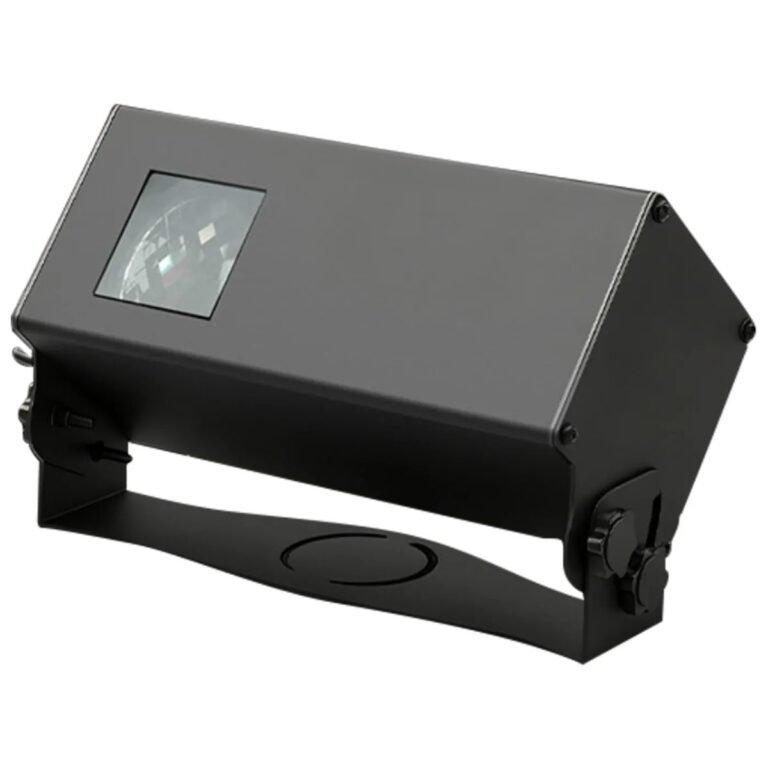
BWL-3D-001 gives this article a real product identity, but the photograph proves only what is visible. It does not show an Amazon request, establish which documents a store requires, or prove that a submission will be accepted. The same boundary applies to every image in this guide.
This article is operational sourcing guidance, not legal advice. Amazon requirements can change by store, product, category, configuration, claim and date. The seller must read the current official policy and the exact request inside its own account at the time of submission, and obtain qualified advice where interpretation is needed. The broader causes of a marketplace interruption, intellectual-property questions and a pre-order evidence pack belong to our listing interruption and supplier-risk guide. This article starts only after a current Amazon compliance task exists.
What Does Amazon Laser Product Compliance Mean Inside Manage Your Compliance?
A seller may speak about “the Amazon requirement” as if it were one rule attached permanently to a product category. The operational unit is narrower: a current request shown for a particular product in a particular account and store.
Inside the working queue, Amazon laser product compliance means answering the exact current request connected to the displayed product, ASIN and seller SKU. Preserve what Amazon asks for, the status it shows, the response deadline or action state if displayed, and the precise submission made against that row. Do not replace the live request with a supplier's general document list.

Amazon's official Manage Your Compliance description says the dashboard can show the product name and image, ASIN, seller SKU, specific requested documents or information, and the status of submitted material. Those fields are enough to define a response row. They are not permission to assume that a requirement shown for one product automatically transfers to another.
I copy the request into a buyer-controlled register before asking our factory for anything. The register preserves the platform wording while letting the buyer add the physical configuration and file ownership that Seller Central cannot know by itself.
| Queue field | What to capture | Why it matters |
|---|---|---|
| Store and account context | The Amazon store and account in which the request appears | Requirements and workflows can differ across stores |
| Request identity | Task reference, request date, current wording and any displayed action date | Prevents a later screenshot or email from replacing the original task |
| Product identity | Displayed name/image, ASIN and seller SKU | Connects platform identity to the seller's catalogue |
| Requested item | Each document, information field or action exactly as shown | Stops the response from expanding into an uncontrolled folder upload |
| Current state | Requested, submitted, under review, action required or another status shown | Separates platform workflow from internal assumptions |
| Submission record | File/version or information submitted, account user and timestamp | Creates a reproducible history for the same row |
The seller should retain a dated capture or export where its account controls allow it. A copied row can become stale, so I also record when somebody last checked it against the live page. “Current as of the day we submitted” is a useful boundary. “Amazon always requires this” is not.
The dashboard request is the start of the response operation. It is not a permanent certificate list for every laser or projection product.
Why Is a Static Amazon Laser Product Compliance Checklist Unsafe?
A checklist feels efficient because it lets purchasing request files before the account team opens Seller Central. It becomes unsafe when its version, store, product type or source is invisible.
A static Amazon laser product compliance checklist cannot establish the current requirement for a named ASIN. Amazon describes compliance requirements as product- and store-specific, and it directs sellers to current account tools and Compliance Reference. Use an old checklist only as a question list; the live task and current official policy decide what must be reviewed now.

The factory image contains several projector forms. It does not show Amazon inventory, compliance status or a shared evidence set. I use it to make one sourcing point: products that sit in the same commercial category can still differ in construction, supplied accessories, labeling and intended presentation. A category name is not a controlled configuration.
Give Every Source a Limited Job
| Source | Useful job | Boundary |
|---|---|---|
| Current Manage Your Compliance row | Shows what the account currently asks for and its workflow state | Does not by itself prove legal conformity or file applicability |
| Current official Amazon policy/help in the account | Explains the current policy and submission process | Must be read for the correct store, product and date |
| Compliance Reference | Helps the seller research product/store obligations and possible support | Amazon still tells sellers to perform their own current research |
| Supplier document index | Shows files the supplier says are available | Does not establish that Amazon requested or will accept them |
| Earlier submission record | Shows what was sent for an earlier task | Can be reused only after identity, version and current-request review |
| Third-party article or forum post | May reveal a question another seller faced | Cannot replace official current policy or the seller's live request |
Logged-in laser help pages were not publicly readable during the research for this article. I treat that as a clear stop. I do not reconstruct an exact laser-document list from forum posts, screenshots or old seller anecdotes. The account owner reads the current page and copies the exact requirement into the working row.
This also protects the seller from a subtler error: a platform status is not a universal legal decision. “Accepted” or a similar state may close a particular Amazon task at a particular time. It does not automatically validate a file for another store, regulator, retailer, shipment, product version or future request.
Which Product Identity Should Be Frozen Before an Amazon Upload?
The ASIN and seller SKU are necessary platform identifiers, but neither describes every physical and customer-facing element that may change while the listing name remains the same.
Before an Amazon upload, freeze the ASIN, seller SKU, buyer product code, supplied model/configuration, power path, label, manual, packaging and listing claim versions that form the sellable offer. Record the approved reference and effective date for each field. If the physical unit or customer-facing files changed, hold inherited evidence until the responsible reviewer checks the impact.

The opened projector is generic factory-process context. It is not BWL-3D-001 or BWL-OL-001 evidence, and it cannot reveal which Amazon requirement applies. It illustrates why two units with a similar external listing image can have meaningful internal or supplied-system differences.
I use a freeze sheet that connects four identities:
| Identity layer | Minimum fields | Typical mismatch to stop |
|---|---|---|
| Platform | Store, ASIN, seller SKU, displayed title/image, variation relationship | The request row points to a different variation or sellable offer |
| Buyer catalogue | Buyer SKU, internal revision, brand/artwork version | A private-label code maps to more than one supplied configuration |
| Physical product | Public supplier SKU, approved configuration, unit/batch reference, optical/control options | The current unit differs from the approved or documented version |
| Supplied system | Adapter, cable, remote/controller, mounting/accessories | A component file is mistaken for finished-product evidence |
| Customer-facing files | Product label, warning/safety text, manual, packaging, listing claims and images | The uploaded evidence and marketed claim describe different states |
This is not a second lesson on reading laboratory reports. Our test-report model coverage guide owns the deeper task of connecting tested model, added models and the purchased item. Here, the buyer records only whether the current file has been mapped to the frozen sellable configuration by the responsible reviewer.
Freeze Does Not Mean “Never Change”
A freeze creates a visible baseline, not a ban on engineering or artwork updates. When something changes, I add a new revision and make the old relationship explicit. The buyer then decides which Amazon request rows, evidence mappings, declarations, labels or listing claims need review. Silent replacement is the dangerous state because it lets a current-looking filename carry an earlier product assumption.
The same rule applies to an adapter. A file about the adapter is evidence about that adapter within its scope; it is not automatically evidence for the complete projector. The seller should preserve the exact supplied power configuration without turning a component document into a finished-product conclusion.
How Should the Amazon Request Queue Map Files and Owners?
Once product identity is frozen, teams often move every available PDF into a folder named after the ASIN. That makes retrieval easier but still hides applicability, status and ownership.
Map each requested item to one controlled file or information source, its version/date, stated scope, product relationship, internal reviewer, submission owner and open question. Use visible states such as unavailable, retrieval pending, mapping review, ready, submitted, action required and superseded. Never promote “file received” to “applicable” or “submitted” to “accepted.”

The packing image is useful because labels, manuals, inserts and retail boxes can change after a sample is approved. It does not show an Amazon evidence package or prove that the visible packaging is ready for any market. I record those file versions because a request may expose a mismatch between the physical offer and the submitted material.
Use States That Cannot Be Misread
| Internal state | Meaning | Next action |
|---|---|---|
| Requested | Amazon currently asks for the item on this row | Confirm owner and product/configuration identity |
| Retrieval pending | A named source says the file exists but the controlled copy is not in hand | Retrieve and log the actual file before review |
| Mapping review | File is in hand; applicability to the frozen sellable configuration remains open | Technical/compliance owner checks scope and differences |
| Ready for submission | Internal review has connected the response to the request and frozen configuration | Account owner submits through the current workflow |
| Submitted | The exact file/information was sent against the row | Preserve timestamp, submitter and platform receipt/status |
| Action required | Amazon requests further information or another action | Capture the new wording; do not overwrite the original request |
| Closed for this request | The account shows no further action for this particular row at this time | Preserve the boundary; do not generalize to another product or authority |
| Superseded | A newer product, file or response version replaces the earlier one | Retain history and prevent accidental reuse |
I also keep responsibilities separate:
- Seller/account owner: reads the current task, controls the ASIN/SKU relationship, submits through Seller Central and records the platform state.
- Buyer product owner: freezes the sellable configuration and listing/customer-facing versions.
- Factory: identifies the supplied product, configuration and available source records; retrieves named files and discloses relevant changes.
- Document or technical owner: checks file identity, scope and version relationship.
- Qualified compliance adviser: interprets applicable legal requirements where the buyer needs that judgment.
The factory can make product identity and evidence retrieval easier. It cannot take over the seller's account, listing claims, destination decision or platform submission responsibility merely by sending a certificate folder.
A useful response row shows who knows the product, who owns the file, who makes the interpretation, and who presses submit. Confidence without ownership is not a workflow.
What Should Happen After an Amazon Compliance Submission?
Submission is an event in the queue, not the end of the evidence lifecycle. The next state may be review, a request for more information, a different action, closure for that task or a new request later.
After an Amazon compliance submission, preserve the request snapshot, exact response, file hashes or controlled versions, submitter, timestamp, receipt or confirmation, and every later status change. Add new requests as new events instead of rewriting the first one. If the product, claim, file or store changes, reopen applicability before reusing the response.

Bowlum's rack image shows units operating in a factory setting. It is not an Amazon review, a marketplace test or proof that a platform task will close. Factory controls and platform evidence workflow answer different questions, so I keep them in different columns.
Preserve a Submission Event Log
| Event | Record | Do not infer |
|---|---|---|
| Submitted | Request row, response/file version, submitter, time and any receipt | That Amazon has reviewed or accepted it |
| Under review | Platform wording and time observed | A guaranteed review time or result |
| Further action shown | Exact new request, deadline/action state and affected product | That the first file was false or that cause is known |
| Closed/no action shown | The account state and observation date | Permanent acceptance for every future request |
| Product/listing changed | Revision, effective date and affected ASIN/SKU | That the old response still applies |
| File superseded | Old and new controlled versions plus reviewer | That the newer filename alone proves broader scope |
If Amazon offers an appeal or resubmission path for the current task, the account owner follows the current official instructions. I do not prescribe an appeal argument from outside the account because the facts, store, request and available evidence differ. The operational control is to preserve what changed between submissions and why the new response maps to the same frozen product—or to a newly declared revision.
Bulk upload can reduce repetitive account work, but scale does not remove product identity. Amazon's official description says sellers can work with many active requests through a spreadsheet. I would still require one auditable row per product/request relationship and block copy-down where a file's applicability has not been reviewed.
How Did a Seasonal Seller Turn “Amazon Laser Documents” Into a Working Queue?
A seasonal marketplace seller showed me a spreadsheet titled “Amazon laser documents.” It contained filenames, supplier names and two store destinations, but it did not preserve the live request wording, ASIN-to-seller-SKU relationship, product revision or submission state. Nothing in the sheet proved that a listing had been removed, and I did not invent that event to make the risk sound urgent.
I converted the sheet into one current request row per store and sellable product. The seller captured the live task, ASIN and seller SKU; the product team froze each offered configuration and artwork version; the factory owner mapped available files and retrieval gaps; and the account owner recorded the eventual submission state. The outcome was a controlled review gate, not a promised Amazon decision.

A Buyer Case: From an Undated Spreadsheet to a Submission Gate
The first correction was scope. Two products shared “laser projector” in the internal description, but that phrase did not establish that their requested information, physical configuration or evidence relationship was the same. We separated the rows and kept every blank visible.
The second correction was chronology. Several filenames contained no effective date, and one internal copy had been renamed after receipt. I asked the document owner to identify the controlled source version rather than letting the most convenient filename become the submission record.
The third correction was responsibility. The seller originally wrote “supplier to solve” in the owner column. I split it into factory file retrieval, buyer configuration confirmation, qualified interpretation where needed, and Amazon account submission. The factory could close its evidence inputs without pretending to control the platform response.
The seller's decision changed from “Do we have an Amazon laser pack?” to three answerable questions:
- What does the current store request for this ASIN and seller SKU?
- Which frozen product and customer-facing versions does the request concern?
- Who owns each evidence, interpretation, submission and follow-up action?
The row stopped at “ready for account submission” until those questions closed. I did not claim a review time, acceptance, restoration, sale or regulatory result. The value of the exercise was operational: the next account user could see what was requested, what was sent and which assumption remained open.
Conclusion
Amazon laser product compliance should be run from the current Seller Central request outward. I capture the store, request, ASIN, seller SKU and displayed product; freeze the physical and customer-facing configuration; map each requested item to a controlled source and owner; record the submission event; and preserve every later status or supersession without generalizing the result.
That scope keeps this article separate from the broader listing-interruption and product-report guides. It also protects the seller from two opposite errors: uploading a general folder because it looks complete, or treating an account status as a universal legal conclusion. The practical decision rule is simple: no file enters the response row until its current request, product relationship, version and owner are visible.
Frequently Asked Questions
Where should an Amazon laser product compliance review start?
Start with the current request inside the correct Seller Central account and store. Capture the displayed product, ASIN, seller SKU, exact requested item and current status before asking a supplier for files.
Can I use an Amazon laser document checklist found online?
Use it only as a question list. It cannot establish the current requirement for your store, product, ASIN, configuration or claim. Verify the live task and current official policy in your own account.
Does a file accepted for one ASIN work for another ASIN?
Not automatically. Recheck the product identity, supplied configuration, store, request wording, document scope and current version before reusing any response.
What product fields should be frozen before submission?
Freeze the store, ASIN, seller SKU, buyer SKU, supplied product/configuration, power and control path, label, manual, packaging, listing claims and images that define the sellable offer.
Who owns an Amazon compliance submission?
The seller or account owner controls the current task and submission. The buyer product owner, factory, document owner and qualified compliance adviser can provide distinct inputs, but a supplier file transfer does not shift the seller's platform responsibility.
Does an Amazon task status prove legal conformity?
No. It records a platform workflow state for a particular request. It should not be generalized to another product, store, authority, retailer, shipment or future date.
What should be retained after an upload?
Keep the original request snapshot, exact response and controlled file versions, submitter, timestamp, receipt or confirmation, later status changes, further-action wording and supersession history.